


AI Charting · Powered by Patient Context
A scribe writes down the visit. Clinicmaster documents the patient.
Most AI scribes capture one visit, then forget. Clinicmaster's AI Charting drafts every note, letter and report from the patient's full chart — prior notes, history, diagnosis — with conversation memory, right inside your EMR. You dictate or type; it drafts in your clinical voice; you review, edit and sign.
AI Charting
AI Charting is Clinicmaster's context-aware documentation assistant, built into the EMR. You dictate or type the visit; with one click it drafts a SOAP note, plan of care, letter or case summary — grounded in the patient's full chart (prior notes, history, diagnosis) with conversation memory, for you to review, edit and sign. A session scribe captures one visit; AI Charting documents the patient.
Context is the difference.
A session scribe is a stateless tool — it captures what was said in one visit, then forgets. Clinicmaster's advantage is Patient Context: it retrieves the patient's full chart and carries memory across the conversation, then drafts from all of it. It's the same reason context beats a one-shot prompt — it's literally how our AI is built.
- ✕ Captures a single visit, then forgets it
- ✕ Produces one output: the note
- ✕ No memory across visits or cases
- ✕ Blind to the rest of the patient's chart
- Drafts from the full chart — prior notes, history, diagnosis, ICD, funder, referrer
- Nine document types from one engine, not just a note
- Multi-turn conversation memory about the patient
- Case Snapshot assembles the whole case on demand
AI documentation across the whole patient journey.
A session scribe captures one moment. Clinicmaster documents the patient before, during and after every visit — grounded in the full chart. Competitors own only the middle box, and only the note inside it.
- Online intake form
- Health history
- Consent forms
- Outcome-measure questionnaires
- Dictate or type the visit
- Visit note (assessment / SOAP)
- Plan of care
- Referral & physician letters
- Case summary (whole case)
- Letters to adjuster / case manager
- PDF & web forms
- Follow-ups & communications
Every note, letter and report is generated from the full chart.
Drafts are grounded in the patient's prior notes, history, diagnosis, ICD codes, injury date, funder and referrer — with multi-turn conversation memory. This is what a session scribe cannot do, and why our drafts understand the patient. Before-the-visit AI is on our roadmap; during and after are live today.
Time, care and business — not just speed.
Most tools sell only the first rung. Because every draft is grounded in Patient Context, Clinicmaster earns all three.
- Draft from dictation or text
- Draft → review → sign
- Real-time streaming drafts
- Full context across prior notes & case history
- Case Snapshot of the whole case
- Required-field templates & anti-hallucination guardrails
- Plans of care, letters, PDF & web forms
- Case summaries for funders
- Multi-site template standardization · EN & FR
From conversation to chart, in three clear steps.
Dictate or type the visit.
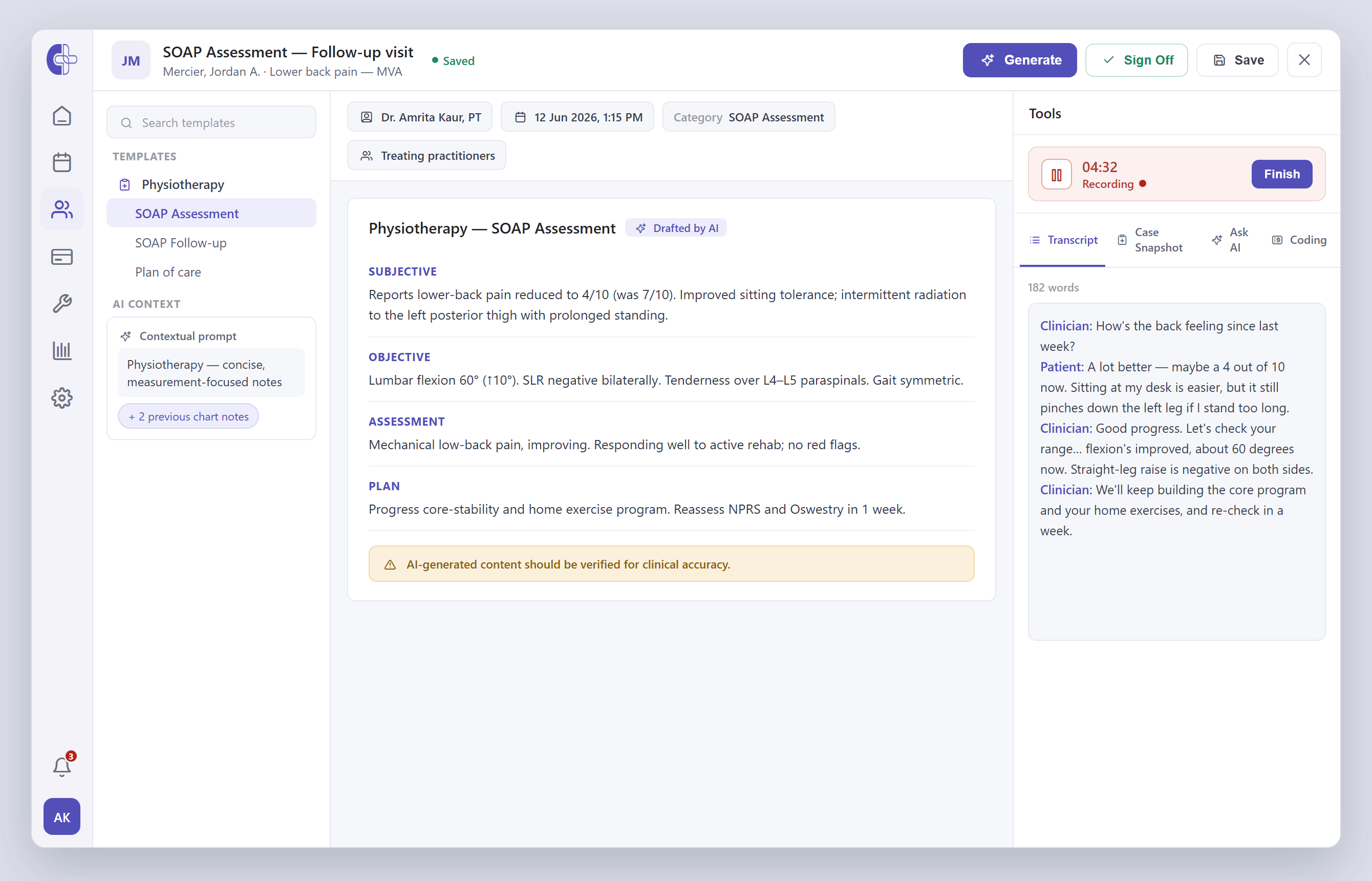
Open the chart note and dictate, or type it in. A focused panel handles the input — pause and resume as you go, with a consent banner and clear controls. No extra app to launch mid-visit.
One click drafts from the whole chart.
Pick your specialty template and click Generate. AI drafts a structured note, plan of care or letter — grounded in the patient's prior notes, history and diagnosis, in your clinic's vocabulary.
Review, edit and sign — it saves to the EMR.
Nothing auto-saves. Edit the draft, sign off, and the note lands in Clinicmaster's EMR — one patient record, no double entry, with peer review and signature where you need it.
Every draft, grounded in Patient Context.
Built into the EMR, not bolted on. You dictate or type; AI drafts from the transcript and the full chart; you review, edit and sign. Notes, plans of care, letters and case summaries — all clinically grounded. Scroll to walk through it.
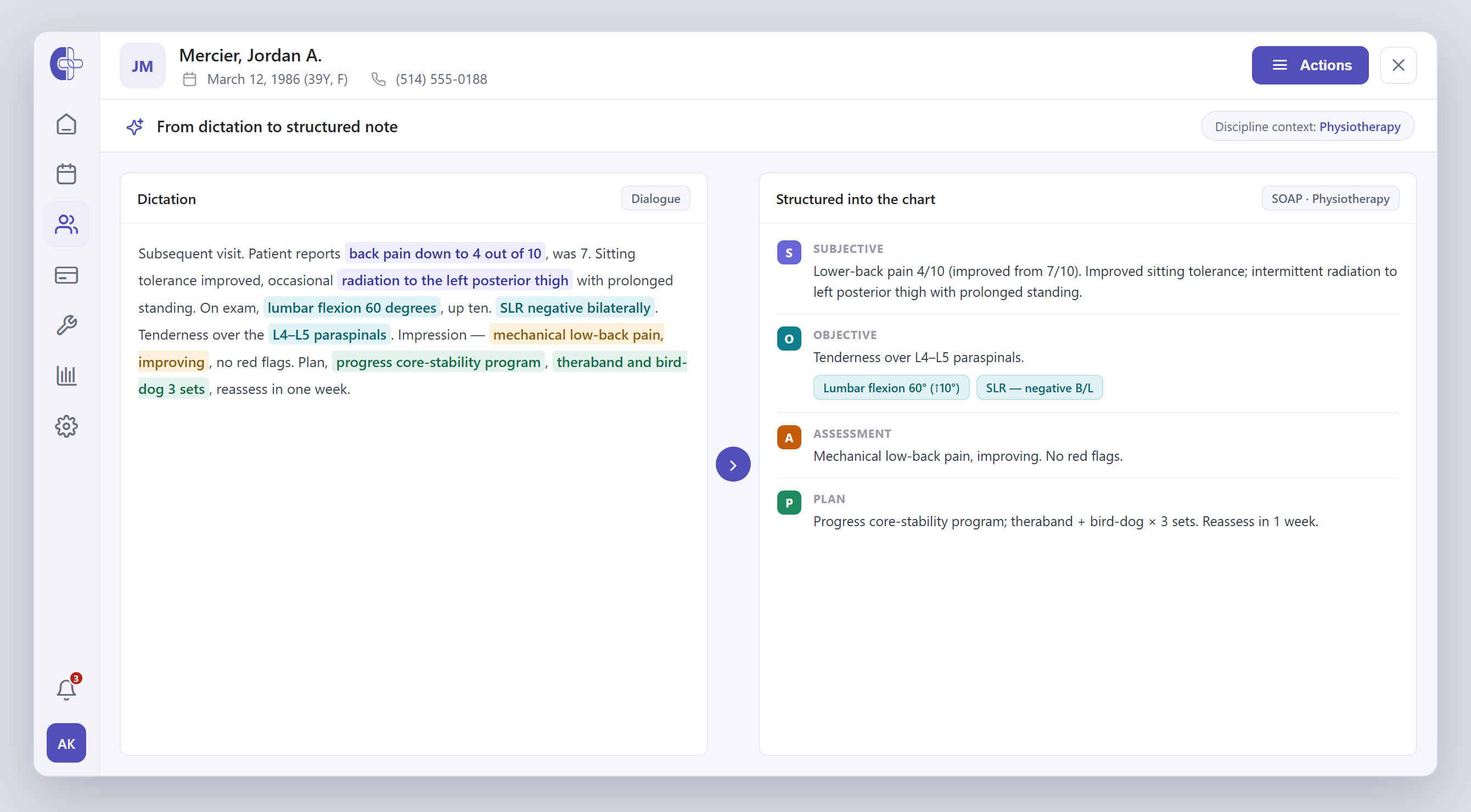
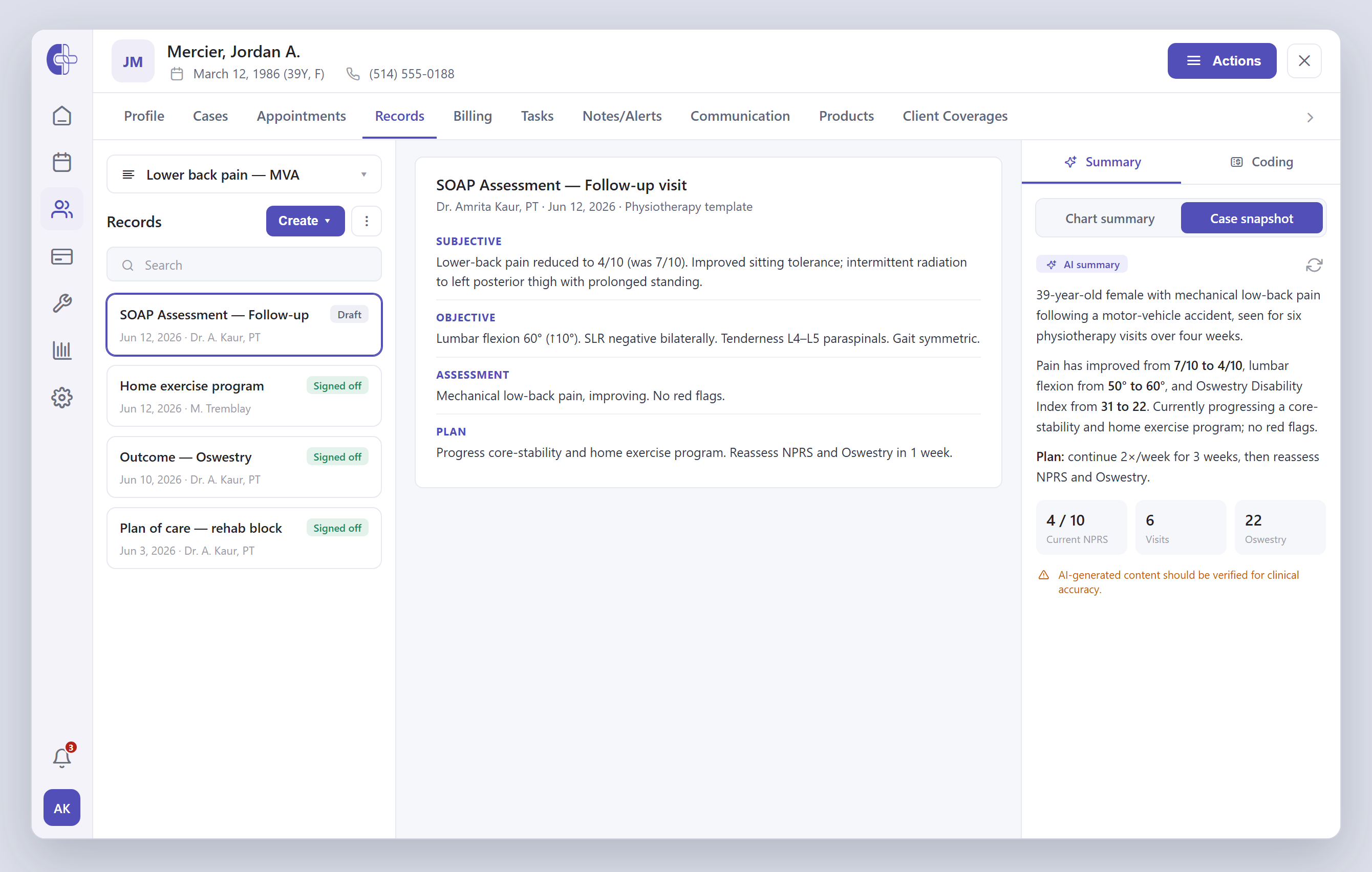
Talk through the visit. Get a structured draft.
Dictate or type the visit and AI drafts a structured note — parsing measurements, terms and abbreviations into the right SOAP sections, and aware of the patient's prior notes so the draft reads like a colleague wrote it.
- Dictate or type — one click drafts the note
- Measurements parsed into the Objective section
- Each draft aware of prior chart notes
Templates and prompts tuned to how you chart.
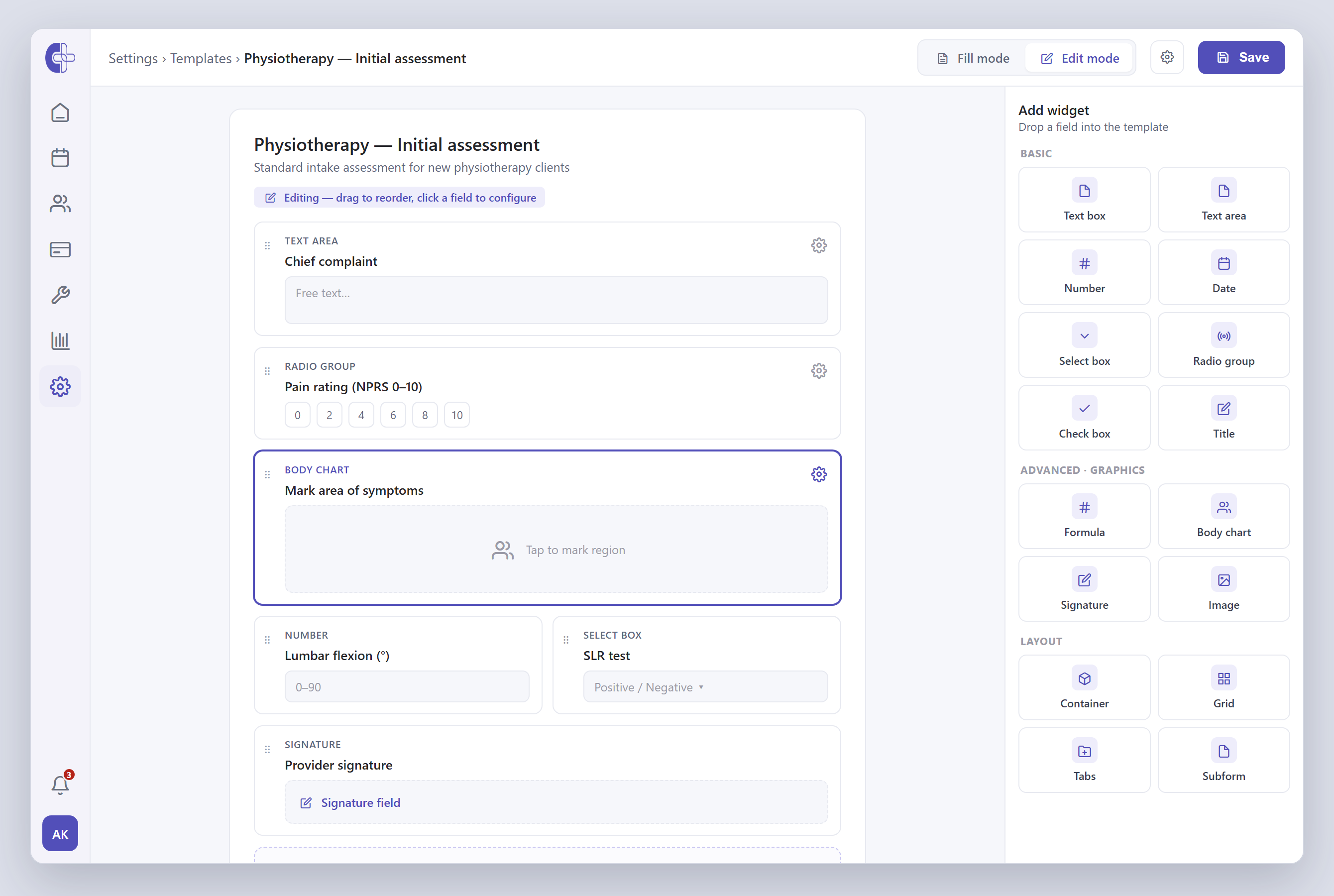
Build chart-note templates with the drag-and-drop form builder, and add specialty contextual prompts so the AI drafts in the right voice. Standardize across the whole clinic or network, with per-practitioner creativity tuning.
- Drag-and-drop form builder
- Per-practitioner templates, prompts & creativity
- Standardize across every location
Ask about the patient — not just the visit.
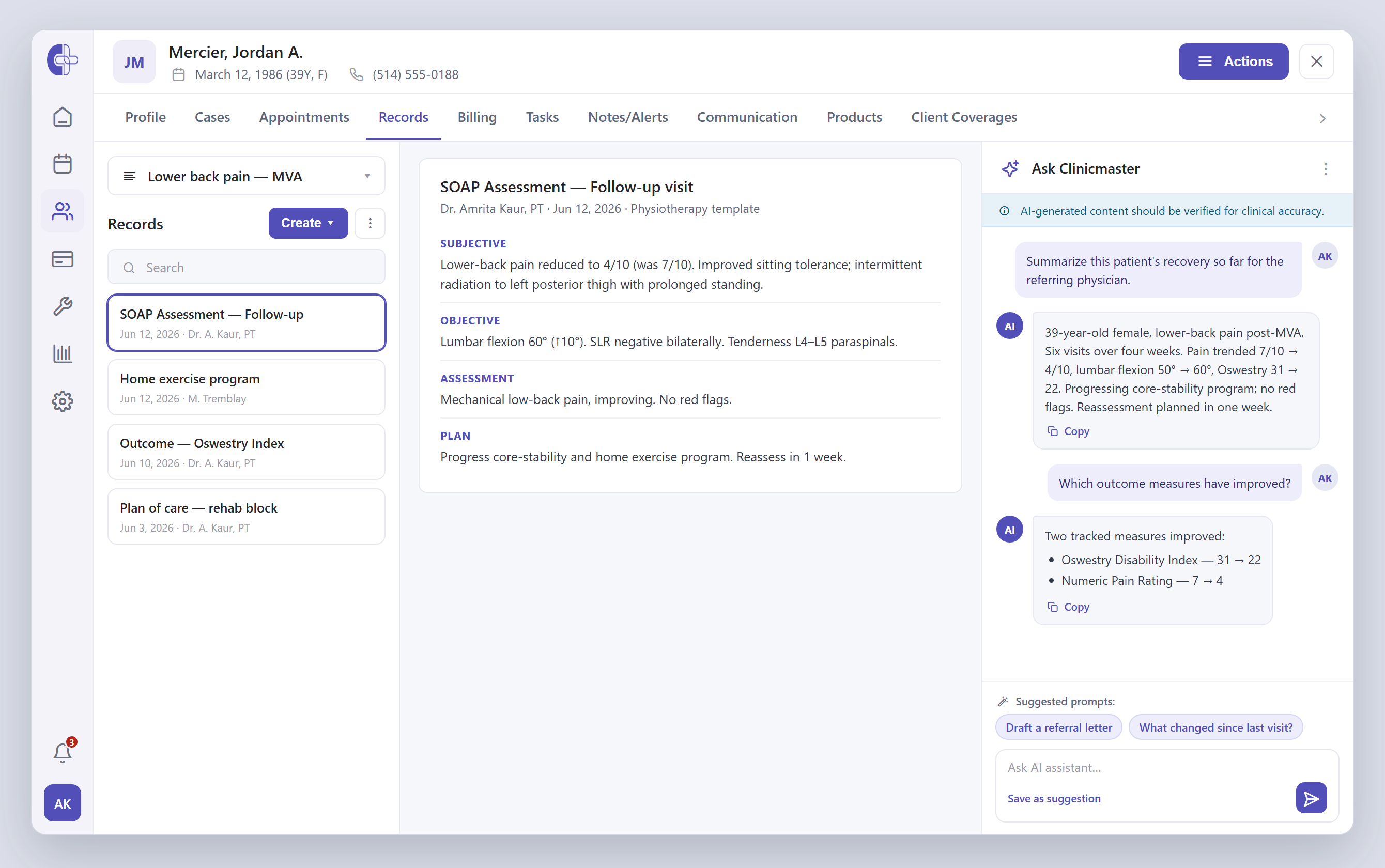
The built-in assistant summarizes a case, pulls relevant history, drafts a letter or refines a draft — grounded in the whole chart and carried across turns of conversation. You decide what goes in, and every response flags that it should be verified.
- Multi-turn memory about the patient
- Summarize a case · draft a referral letter
- You decide what goes into the chart
Case summaries, plans and letters — from the full record.
Case Snapshot assembles a multi-visit overview of the whole case on demand. Condense plans of care into clear overviews for clinicians, patients and funders, and generate letters — all drawn from the full record.
- Case Snapshot across every visit
- Clinician, patient & funder summaries
- Letters, PDF & web forms
A scribe produces one thing. We produce the whole set.
One context-aware engine drafts nine document types — each grounded in Patient Context.
Context is real
Every draft is grounded in the patient's prior chart notes — it even reads past note PDFs — plus case history, diagnosis, ICD codes, injury date, funder and referrer.
Memory is real
Multi-turn conversation memory, so you can ask about the patient across turns and the assistant keeps the thread — not one stateless prompt at a time.
Case Snapshot
Assembles a multi-visit clinical overview of the whole case on demand — the continuity a session scribe structurally can't provide.
Control & safety
Draft → review → sign, with a peer-review and signature workflow, anti-hallucination prompts, low default creativity and nothing auto-saved. Runs on Azure OpenAI and Google Gemini.
Charting at the scale clinics already run on.
Ready to see AI Charting in your clinic?
Book a 30-minute working session with a solutions engineer. Bring your current workflow — we'll show you exactly how documentation grounded in the full chart fits.
Four charting problems clinicians live with every day.
What clinics actually ask AI Charting to do.
I want my note ready to sign before the patient leaves the room.
I need accurate charting without slowing down patient interactions.
We want documentation standardized across providers and locations.
I want visit notes turned into letters and forms.
Built for the clinicians who'd rather be charting less.
Busy clinicians in high-volume practices
Get charting off the critical path so the time goes back to direct patient care.
Multi-specialty clinics with complex workflows
Specialty-specific templates, funder forms and intake — all standardized in one place.
Healthcare teams reducing admin load
Cut the documentation burden without giving up accuracy or completeness.
Practices seeking standardized, compliant docs
Consistent structure and audit-ready records on every chart that comes off the platform.
Patient data, protected at every layer of the chart.
Every transcript, draft and finalized note is encrypted, access-controlled and audit-logged, with configurable transcript-retention limits and a consent banner at the start of every recording. The AI runs on Azure OpenAI and Google Gemini. SOC 2 Type II certified, and fully compliant with HIPAA, PIPEDA, PHIPA and Quebec's Law 25 — never bolted on.
Learn more about securityFrequently asked questions.
Scale your Organization with Clinicmaster.
30-minute working session with a solutions engineer. Bring your current numbers — we'll show you the gap.